
Build a Mixed Energy and DIY RFQ with One Stable Reference per Variant
Keep mixed energy and DIY requests traceable with stable buyer IDs, explicit units, a controlled worksheet and matched supplier replies.
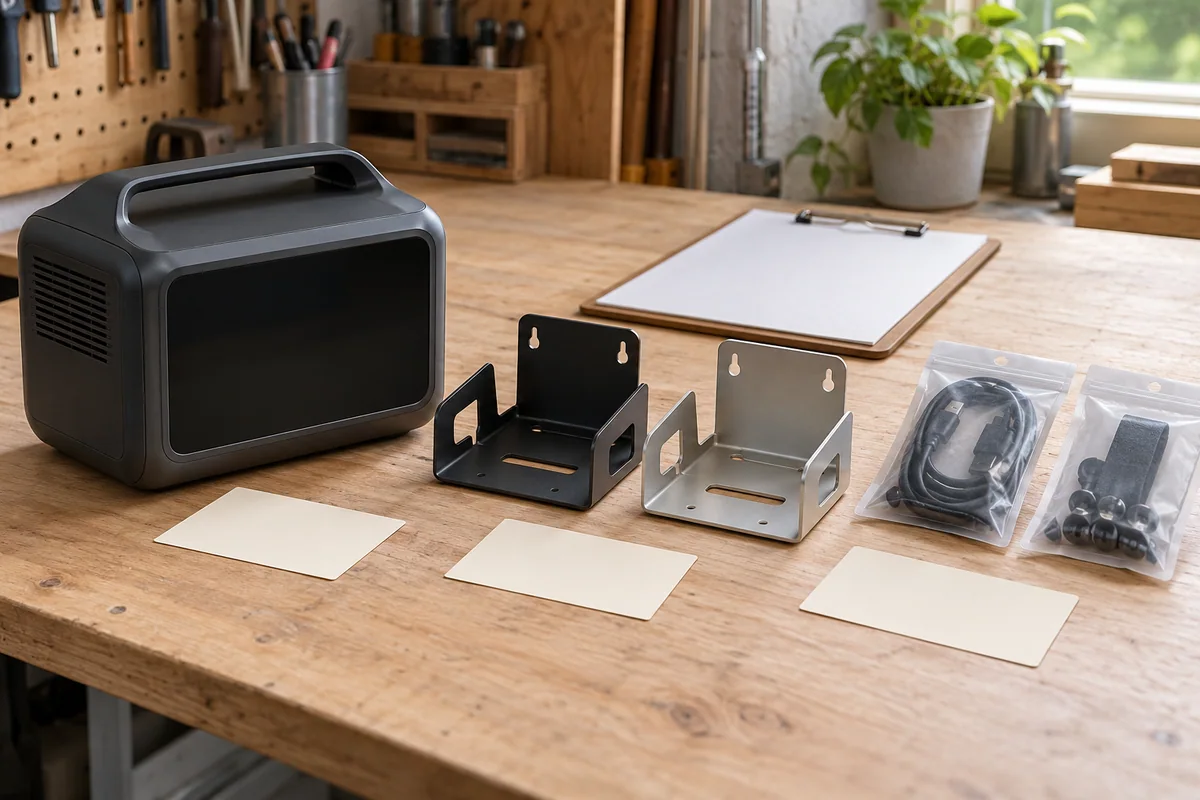
A mixed request for an enclosed power product, passive brackets and accessory packs needs a stable reference for every separately quoted variant. Give each line a buyer ID, then ask the supplier to repeat that ID beside its quoted model, quantity and exceptions. The useful outcome is a reply you can reconcile without guessing which item a price belongs to.
Keep the master worksheet under your own control. A marketplace URL identifies a listing; the option text, specification and selling unit identify the requested variant. Two lines can share a URL while requiring different replies. A reference such as EN-01 or BR-02 is a buyer-maintained label, not evidence that an item has been approved.
Decide what deserves its own line
Create separate lines when the model, option, material, finish, included contents or approval decision differs. If two bracket finishes need separate prices, give them separate IDs even when the supplier sells them on one page. Do not rename an existing ID to hide a replacement product. Preserve the original and give the proposed replacement a distinct alternative reference.
For a finished energy product, record the exact manufacturer/model offered and the relevant specification document. Keep any unresolved identity visible. An accessory can be its own requested line or an explicitly included component of another line; choose one treatment and avoid counting it twice. “Accessories included” is incomplete when the actual contents affect the buying decision.
Record the quantity and selling unit together. Ten packs, each containing two specified brackets, means ten purchasable packs and twenty brackets under that stated composition. It does not mean twenty packs. If pack contents remain unconfirmed, leave the piece-equivalent total open rather than filling it from a photograph.
Use a reference master that survives the reply
The following basket and document IDs are fictional. They demonstrate record structure, not available inventory, an engineering design or a completed customer order.
| Buyer ID | Requested item and option | Quantity and unit | Requirement document | Question still open | Supplier reply mapping |
|---|---|---|---|---|---|
| EN-01 | Finished enclosed power product, option E | 3 complete units | REQ-EN revision A | Exact model and included accessory list | Await quote and line ID |
| BR-01 | Passive organizer bracket, black finish | 10 packs; 2 identical brackets per pack requested | REQ-BR revision B | Confirm pack composition and finish | Await quote and line ID |
| AC-01 | Manufacturer-specified accessory pack for EN-01 | 3 packs; contents unresolved | ACC-LIST revision A | Confirm contents and whether already included in EN-01 | Hold comparison |
Keep the original listing URL and exact option wording in the underlying worksheet, together with the supplier name and date captured. The compact table above omits URLs to remain readable; a real register should not lose them. Add a separate document index if one line needs several drawings or model documents.
In this example, BR-01 requests twenty brackets through ten packs. EN-01 requests three finished products. AC-01 does not yet support a total individual-component count. Adding all these quantities into a single “16 items” total would obscure their different units.
Carry your references through the request form
The source code reviewed for this article on 13 October 2026 has Link, Screenshot and Describe input modes, plus quantity, destination and contact details. Its saved list holds up to twenty link or description references. The list rejects matching reference text without regard to letter case; changing only the quantity does not create another variant of the same reference. These are observations of the reviewed quote-list code, not a live submission test.
For two variants from the same URL, use separate Describe entries containing your own ID, exact option and source URL. A concise entry might read: “BR-01; black organizer bracket; REQ-BR revision B; ten packs of two requested; source URL: [your saved URL].” Give the other option its own ID and description. The reviewed Describe validation accepts 8–1,200 trimmed characters; keep longer specifications in the master record and agree how to share them.
The source-reviewed form has no dedicated SKU, selling-unit or drawing-revision field. Its Item 1 and Item 2 labels are positions in the current list. Do not use those positions as permanent buyer IDs or expect automatic variant parsing, worksheet import or revision tracking. The reference you type is what preserves your intended meaning in the request text.
Screenshot attachments belong to the inquiry as a whole. Label supporting images with the relevant buyer ID and explain that association in the description. An uploaded image does not create a saved variant row. The reviewed implementation accepts image attachments, not spreadsheet, PDF or CAD uploads, so keep the working worksheet locally and arrange an accepted document-sharing method with the recipient. Reviewed input validation
Send one identifiable worksheet revision
Before requesting prices, give the worksheet a batch name, revision and issue date. State which lines are active, which are alternatives and which remain questions. Ask for acknowledgement of that revision rather than assuming the newest attachment replaced every earlier message.
When the basket exceeds the available saved-list limit, divide the request into clearly named batches. Retain the same master IDs across those batches and ask the recipient how replies will be reconciled. Avoid cramming multiple separately priced products into one description and expecting the form to split them automatically.
A short covering request can say: “Please return one response for each active buyer ID in worksheet RFQ-E revision B. Repeat our quantity and selling unit, identify your quote line, and list any unanswered requirements or alternatives. Do not replace a requested item without a separate proposal.” This describes the response you want; sending it does not approve a purchase.
Match the answer before assessing the price
Add the dated quote reference and the supplier’s own line ID beside each buyer ID. Mark each line as answered to the requested basis, awaiting clarification, proposed alternative or withdrawn. Those labels describe the RFQ record; they are not engineering, safety or shipment approvals.
If a reply combines EN-01 and AC-01, ask whether the accessory packs are included in the complete-unit price or additional goods. If it quotes BR-01 per piece, preserve that quoted unit and request the corresponding pack composition. A manually checked conversion can then connect the answer to the request. Do not silently change either side’s original quantity.
Hold the affected comparison when a quoted line has no matching buyer ID, one ID points to two conflicting products, a revision is missing, or pack contents change without explanation. Continue clarifying independent lines, but keep dependencies visible. A finished device and its required accessory may need a joined decision even though their prices are separate.
Close the RFQ record with the accepted requirement revision, matched quote and remaining approval conditions. Retain earlier versions and the reason for each change. That gives the next reviewer a reliable answer to a narrow question: exactly which requested variant does this supplier response describe?
Frequently asked questions
Can two variants use the same listing URL?
Yes, in the buyer worksheet. In the source-reviewed form, repeated reference text is rejected, so use distinct Describe text containing each buyer ID and exact option. Confirm the displayed form before sending.
Does a screenshot create a separate product line?
No such behavior is established. The reviewed code treats images as inquiry-level attachments. Cross-reference each supporting image manually to its buyer ID.
Can I upload the worksheet itself through the reviewed form?
The reviewed upload validation accepts supported image files, not spreadsheet, PDF or CAD files. Keep the master worksheet locally and agree a supported sharing method for other documents.
What should happen to an unmatched supplier line?
Keep it outside the matched comparison and ask the supplier to identify its buyer reference, specification revision, quantity and unit. Do not guess the match from price or list position.
Sources
Discuss a sourcing request related to this article.Build a Mixed Energy and DIY RFQ with One Stable Reference per Variant